
Elevate your computing and data skills through workshops in Data Discovery & Processing and Qualitative Analysis.
Fall 2026 workshop sessions have been released. View them below
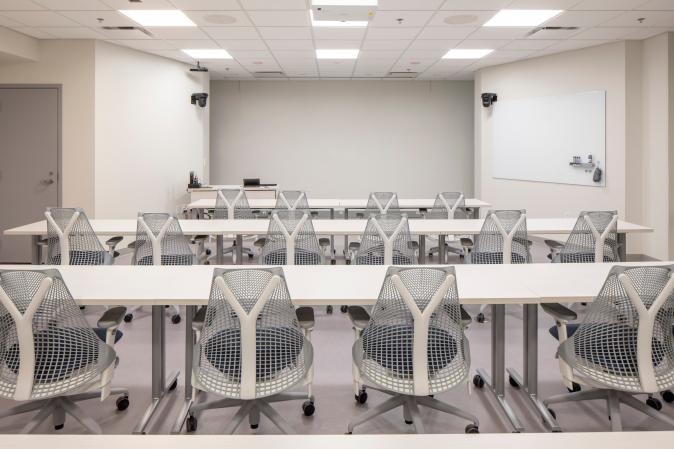
CCSS workshops are held in person at 291 Clark Hall and via Zoom (sent after registering). All workshops are open to the Cornell community. We encourage attending in person for the best learning experience. In-person attendees are provided CCSS swag and a post-workshop Q&A session. Get Directions to 291 Clark Hall.
Recordings for Previous CCSS Workshops:
View Spring 2026 workshop recordings here.
View Fall 2025 workshop recordings here.
View Spring 2025 workshop recordings here.
Message socialsciences@cornell.edu for workshop-related questions.
Working with Survey Responses in Qualtrics | Sept 17 | 12:00pm - 12:50pm
Description:
This workshop will explore Qualtrics, an online tool for creating and collecting surveys. The session will focus on what to do after your survey responses have been collected and you are ready to begin your data analysis. Participants will learn how to access Qualtrics for free through Cornell, view survey responses, and download survey data in a clean format for further analysis using popular statistical software applications.
Learning Objectives:
- View survey response data collected in Qualtrics
- Explore options for downloading Qualtrics survey data
- Import and clean survey data with statistical software applications (Python, R, Stata, Atlas.ti, MaxQDA, etc).
Using the OpenAI API to Automate Bulk Searches | Sept 21 | 1:00pm - 2:15pm
Description:
APIs (Application Programming Interfaces) are tools that make it possible to pull information from services like OpenAI without having to search manually. In this workshop, you’ll learn how to use the OpenAI API to automate bulk searches, collect the results, and organize them into a usable dataset. Familiarity with Python is encouraged but not required, and all code will be provided.
Learning Objectives:
- Understand how the OpenAI API works
- Make API requests in Python and store the responses
- Know when to use APIs instead of web scraping
Pre requisites:
Helpful Information:
Instructor: Jacob Grippin
Implementing Optical Character Recognition (OCR) using Python/R | Nov 3 | 12:00pm - 12:50pm
Description:
Optical Character Recognition (OCR) is the process of converting text found in scanned documents, PDFs, images, and handwritten materials into machine-readable text. OCR can significantly reduce manual data entry and make large collections of documents searchable and analyzable. In this workshop, participants will learn how to use OCR tools within Python and R to extract text from images, PDFs and scanned documents, perform basic preprocessing to improve recognition accuracy, and export results for further analysis. Familiarity with Python or R is encouraged but not required, and all code examples will be provided.
Learning Objectives:
- Understand the fundamentals of Optical Character Recognition (OCR) and its common research applications
- Extract text from images, scanned documents, and PDFs using Python and R OCR libraries
- Apply basic image preprocessing techniques to improve OCR accuracy
- Export and organize OCR results for downstream research and analysis
Pre requisites:
- Install R (windows, mac)
- Install RStudio
- Basic familiarity with either Python or R is helpful but not required
Helpful Information:
- How to Install and load R packages
- Basics of R
- Open R File
- Run code in RStudio
- Python Basics
- How to run code in a jupyter notebook environment
Instructor: Jacob Grippin
Introduction to Web Scraping | Nov 5 | 2:00pm - 3:30pm
Description:
This workshop is associated with the Data Den Workshop Series in Mann Library.
This workshop will be held in Mann Library 102 Conference Room
Learn how to gather data from websites using Python! In this beginner-friendly workshop, you’ll learn the basics of web scraping with Beautiful Soup. We’ll show you how to dig through HTML to find the info you need, and talk about when it makes more sense to use an API or tools like Selenium. You’ll also get tips on cleaning up your data so it’s ready to use.
Learning Objectives:
- Use the Beautiful Soup Python package to parse through HTML (such as tags and attributes) and extract content from webpages relevant to their research questions.
- Compare different approaches (web scraping vs. APIs) and tools (Beautiful Soup vs Selenium) and select the most appropriate one on their skill levels and needs.
- Understand how to clean, structure, and export scraped data to make it ready for analysis
Pre requisites:
- Python basics. (how to run code using Google Colab)
Helpful Information:
- Python Google Colab. Allows users to run Python code without any setup required.
- Python web scraping packages (BeautifulSoup, Selenium)
Instructor: Jacob Grippin
Research Opportunities at the Cornell FSRDC | Nov 18 | 3:00pm - 4:15pm
Description:
The Cornell Federal Statistical Research Data Center (FSRDC) provides access to confidential federal data from several agencies, including the U.S. Census Bureau. The Cornell FSRDC administrator, Nichole Szembrot, will give an overview of the available data and proposal process. This workshop is recommended for faculty and Ph.D. students.
Learning Objectives:
- Understand the advantages of working with confidential data compared to public-use data
- Become familiar with the data available through the Cornell FSRDC
- Understand the process of applying for access to confidential data
Pre requisites:
None
Helpful Information
This workshop will have a 15-30 minute Q&A session afterwards where in-person attendees can ask the instructor questions and get personalized assistance with their research.
Instructor: Nichole Szembrot
Coding and Summarizing Qualitative Data with MaxQDA | Sept 22 | 12:00pm - 1:30pm
Description:
MaxQDA is a popular qualitative analysis software. This workshop covers importing qualitative data files into MaxQDA and using the software to identify themes and trends within text. It will also take participants through the steps of using MaxQDA’s AI features to summarize and explore their qualitative data materials. We recommend attendees arrive with MaxQDA installed on their laptops.
Learning Objectives:
- Explore the MaxQDA interface.
- Import qualitative files including interview transcripts, focus groups, and video and audio recordings into MaxQDA.
- Create and apply codes in MaxQDA to identify themes and trends.
- Generate reports for specific coded segments.
- Use MaxQDA’s AI Assist to summarize coded segments and documents, identify themes, and utilize suggested codes.
- Properly save and back up MaxQDA projects.
Pre requisites:
Make sure you have access to MaxQDA on your computer:
Install MaxQDA through the 14 day free trial before the start of the workshop to follow along and use during the session.
MaxQDA and other similar software are available for free through CCSS Cloud Computing Accounts. For extended software use, please request a CCSS Cloud Computing account by filling out this form.
Helpful Information:
This workshop will have a 15-30 minute Q&A session afterwards where in-person attendees can ask the instructor questions and get personalized assistance with their research.
Instructor: Florio Arguillas
Essential Replication Skills for Your Research | Nov 6 | 12:00pm - 1:30pm
Description:
Replication of results is a core requirement in the scientific method. Satisfying this requirement becomes increasingly complex when using data from disparate sources is integrated and reused. This workshop will walk you through the process of reviewing your manuscript, data, code, and output to ensure your results will reproduce correctly on all systems. We will go over how to package reproduction materials for easy reuse. This can be time-intensive and intimidating, especially for individual researchers seeking to openly share their work, but rewarding as it leads to open and collaborative research. Others can build off your work, moving science further and faster.
Learning Objectives:
- Process of reviewing the manuscript, data, code, output, and other documentation
- Preparing the replication package (consisting of data, code, and other documentation) to make it portable, independently understandable, easily reusable, and ready for publication, archiving, and sharing
- Discuss common mistakes in manuscripts and codes so you can avoid them
- Present CCSS services to assist your research, including Data Archiving and Replication Service
Pre requisites:
None
Helpful Information:
None
This workshop will have a 15-30 minute Q&A session afterwards where in-person attendees can ask the instructor questions and get personalized assistance with their research.
Instructor: Florio Arguillas